
Add Congressional Districts to a Spreadsheet of Addresses
Quickly add Congressional districts and legislator contact information to a spreadsheet of addresses
Need to add Congressional districts or Senator and Representative contact information to addresses in bulk? You're in the right place.
This article shows you how to add Congressional districts to addresses using Geocodio. The Congressional district data returned includes Congressional district number, Congress number, and Congress years, with the option to append legislator data. You can use our API to integrate it into a website, or upload Excel, CSV, and TSV files. You can also view the addresses on a map with Congressional district outlines.
New: 120th Congress (cd120) Preview Available
Congressional district boundaries for the 120th Congress are now available as a preview via the field append. The data is accurate, though some states may receive updates as final redistricting changes are published. You can track which states have received updates via our redistricting tracker. The default field append continues to use the 119th Congress (cd119).
How to Add Congressional Districts to a Spreadsheet of Addresses
1. Organize the addresses you want to add Congressional district info to in a spreadsheet
The first step will be to organize the addresses into a spreadsheet. Your spreadsheet will need to have headers (street, city, state or street + zip). The addresses can all be in one column or in multiple columns, as shown below, as long as it is consistent for the entire spreadsheet.
Multi-column format:
| Street | City | State | ZIP |
|---|---|---|---|
| 960 Orange Avenue | Coronado | CA | |
| 2050 N Stemmons Fwy | Dallas | TX | |
| 5020 E Sprague Ave | 99212 |
Single column format:
| Address |
|---|
| 960 Orange Avenue Coronado, CA |
| 2050 N Stemmons Fwy Dallas, TX |
| 5020 E Sprague Ave 99212 |
However, the formats cannot be mixed as below:
| Location | |
|---|---|
| 960 Orange Avenue Coronado CA | |
| 45.5045128,-73.621345 | |
| 5020 E Sprague Ave | 99212 |
You can also download an example spreadsheet here. The addresses can be missing information as long as they are all consistently formatted. For example, you can have street + zip for some addresses and street + city + state for others.
2. Upload the spreadsheet of addresses to Geocodio to add Congressional district data
Once your spreadsheet is organized, you can upload it directly to Geocodio. After confirming the columns and seeing a preview of the file on a map, you will be presented with options to append data. You will want to check the box that says “Congressional Districts”, with the option to include Senate and Representative info. Counties are included by default with geocoding.
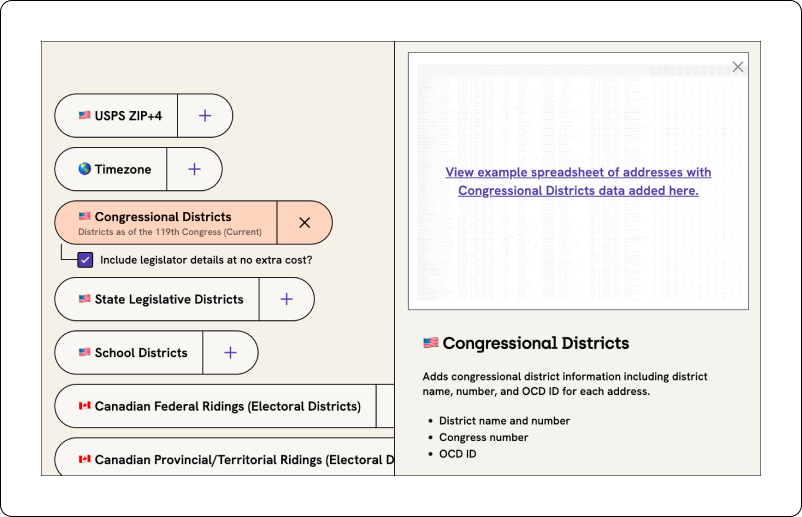
Results are billed as geocode + Congressional district info (i.e., two lookups). For example, if you have 100 addresses that you want Congressional districts for, that would count as 200 lookups. You can calculate how much this will cost you and how long it will take here.
3. Download your completed spreadsheet with Congressional district information added
You will receive an email when your spreadsheet is done processing -- no need to stay on the page.
Find the Congressional district information for a single address
If you just need the Congressional districts and Senator/Representative contact information for one address, you can use the tool below. Just highlight Congressional Districts, then click Geocode Now.
Congressional District Number
For example, Congressional District 8
Congress Number
For example, 118th
Congress Years
For example, 2023-2025
Congressional District Number
For example, Congressional District 8
Congress Number
For example, 118th
Congress Years
For example, 2023-2025
In elections, we can’t have even a 5% tolerance for error. Geocodio gives us the accuracy we need to give people the correct information about the election and remind them to vote.
Debra Cleaver, Founder, Vote.org

Address or Coordinates to Senator and Representative Info
Senator and Representative Names
Senator and Representative Emails
Senator and Representative DC Office Addresses
Senator and Representative Phone Numbers
Senator and Representative Websites
Senator and Representative Parties
Senator and Representative Social Media Links
Senator and Representative IDs
By the time you finish reading this page, the Geocodio API will have processed 5.3 million lookups.
Your data could be next...