
How to Find Ridings for an Address
How to turn a spreadsheet or real-time address or coordinate data into ridings (Canadian federal and provincial electoral districts)
Geocodio can help you turn addresses (or coordinates) into ridings (also known as Canadian electoral districts). You can look up both federal ridings and provincial/territorial ridings.
Organize the Addresses or Coordinates You Want to Look Up Ridings For
How to Format Addresses You Want to Convert to Ridings in a Spreadsheet
First, you will need to organize the addresses (or coordinates) into a spreadsheet. Your spreadsheet must include headers, which can be in French (you'll just need to check that they're properly mapped to English in Step 1). The spreadsheet should be consistently laid out in one of the following formats. Make sure you designate the country as "Canada" (exactly, not abbreviated).
Multiple-column format:
| Street | City | Province | Country |
|---|---|---|---|
| 110 Rue Notre-Dame O | Montreal | QC | Canada |
Single-column format:
| Address |
|---|
| 110 Rue Notre-Dame O, Montreal, QC, Canada |
How to Format Coordinates You Want to Convert to Ridings in a Spreadsheet
You can also use Geocodio to convert coordinates to ridings and approximate addresses. You can use either of the following formats, as long as the entire spreadsheet is formatted the same way:
Multiple-column format:
| Latitude | Longitude |
|---|---|
| 45.504367 | -73.556031 |
Single column format:
| Coordinates |
|---|
| 45.504367, -73.556031 |
Your headers can be in French. You will just want to ensure that they are properly mapped over to English in Step 1.
Identify the Addresses or Coordinates You Want to Convert to Ridings via API
Alternatively, if you'd rather programmatically convert addresses or coordinates to ridings, you can use the &fields=riding or append with our API. See our API documentation here.
Upload the Spreadsheet You Want to Add Ridings To
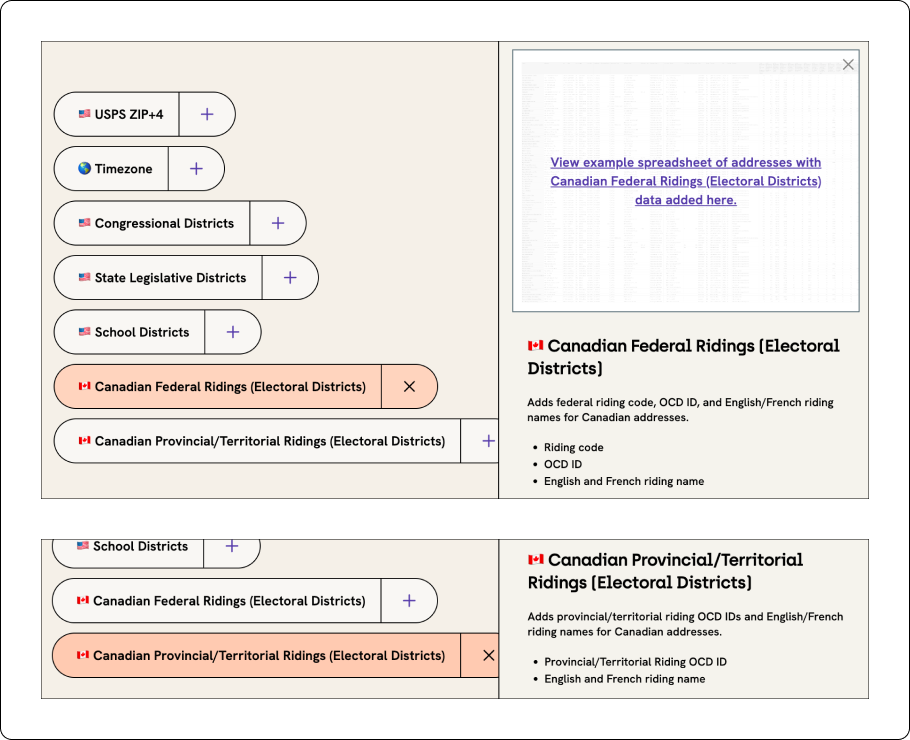
Once your spreadsheet has been formatted, you can upload it through our Upload tool. On Step 3 of the Upload process, you'll want to select "Canadian Federal Ridings" or "Canadian Provincial/Territorial Ridings," as shown below:
Download Your Spreadsheet with Ridings Added
After you press Submit, your spreadsheet will start processing. No need to stay on the page -- we'll send you an email after it's done processing.
Related Resources
Add Ridings to a Spreadsheet
See more about adding ridings to your spreadsheet of addresses or coordinates.
Statistics Canada
Download an examplee spreadsheet with Division IDs and other geographies from Statistics Canada.
How-to: Lookup Statistics Canada Geographies
How-to guide on how to lookup Statistics Canada geographies for addresses or coordinates.
Look Up Provincial/Territorial Ridings
You can add federal-level Ridings as well as provincial/territorial Ridings.
By the time you finish reading this page, the Geocodio API will have processed 5.3 million lookups.
Your data could be next...