
How to Geocode in Google Sheets
Add US & Canada latitude and longitude to addresses to Google Sheets
This tutorial will walk you through how to add geocoding (latitude and longitude) to addresses in a Google Sheet.
Note
Geocodio only supports US, Canada, and Mexico. If you need global geocoding, you'll need to use another provider.
This process may take up to half an hour to set up, so you may want to grab a glass of water and a snack before diving in.
1. Install the API Connector Google Sheets add-on to add the Geocodio API to your spreadsheet
First you will need to install the API Connector Google Sheets add-on. It is free for basic use.
2. Create a Geocodio API key
Create a Geocodio account and then create an API key here. To prevent runaway requests, consider not adding a credit card to your account to start (which will limit you to 2,500 lookups per day) or add a limit to your account.
3. Organize your addresses in the spreadsheet
Your addresses must be formatted consistently and in the one-column format.
If you have the different components in columns A, B, C, D, you can use this function:
=concatenate(A2," ",B2," ",C2," ",D2)

4. Set up the API Connector
In the API Connector window, select Create from the top menu.
The Method should be set to Get.
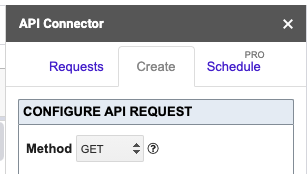
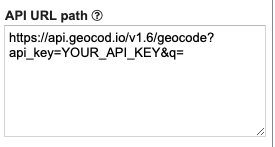
Next, put this URL in the API URL Path box, replacing "YOUR_API_KEY" with your API key.
https://api.geocod.io/v2/geocode?api_key=YOUR_API_KEY&q=
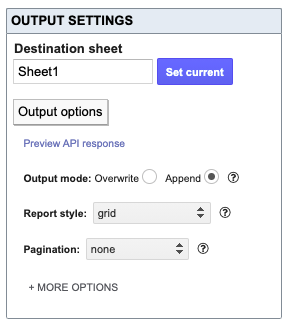
Next, you'll need to configure the output. We suggest either "default" or "grid."
If you want to print the results to a new sheet, specify that in the Destination Sheet. If you want them in the same sheet, it doesn't matter what you put there.
Next, name and save the request. We suggest something simple and one-word like Geocodio. (You'll need this soon.)
Press Save.
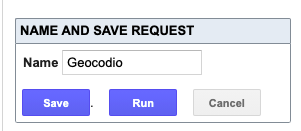
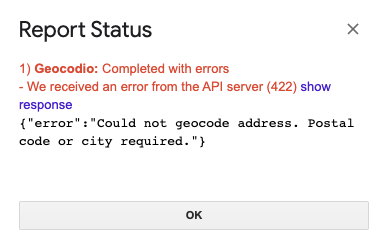
Next, run the request. It should fail with a 422 error. This is a good error! This means you have set it up correctly. (Don't worry.)
5. Implement the ImportAPI function
Now, let's go back to your spreadsheet.
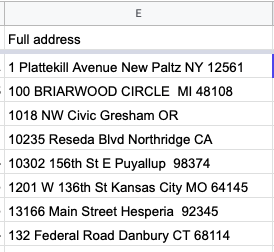
Each address should be in one cell. (To see an example concatenation function, see Step 3 above.) Notice in the example below that the addresses do not need to be complete. You need one of the following combinations:
Street + City + State + ZIP
Street + City + State
Street + ZIP
City + State
ZIP
In the next column over, you'll insert the ImportAPI function, which can only be used if you have the API Connector add-on installed.
This function should look like:
=ImportAPI("Geocodio",CONCATENATE("https://api.geocod.io/v2/geocode?q=",ENCODEURL(E2),"&api_key=YOUR_API_KEY&format=simple"))

Drag the formula down the spreadsheet, and it should run.
The results will then be printed alongside your addresses.
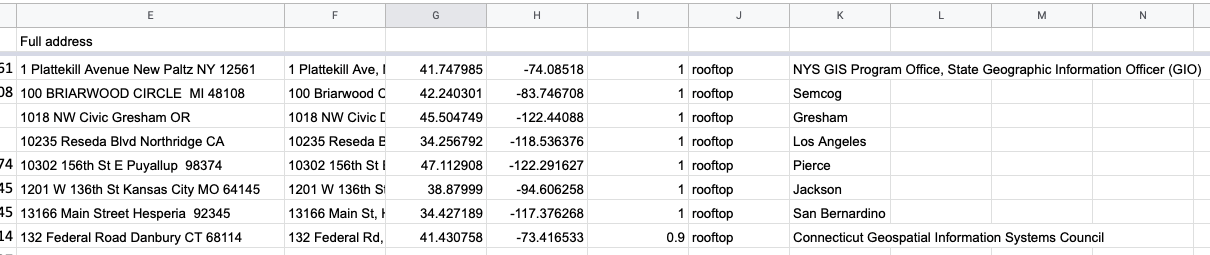
This also works with field appends, so you can, for example, add Census FIPS codes or timezones to your spreadsheet, like so:
=ImportAPI("Geocodio",CONCATENATE("https://api.geocod.io/v2/geocode?q=",ENCODEURL(E2),"&api_key=YOUR_API_KEY&format=simple&fields=census"))
=ImportAPI("Geocodio",CONCATENATE("https://api.geocod.io/v2/geocode?q=",ENCODEURL(E2),"&api_key=YOUR_API_KEY&format=simple&fields=timezone"))
=ImportAPI("Geocodio",CONCATENATE("https://api.geocod.io/v2/geocode?q=",ENCODEURL(E2),"&api_key=YOUR_API_KEY&format=simple&fields=school"))
=ImportAPI("Geocodio",CONCATENATE("https://api.geocod.io/v2/geocode?q=",ENCODEURL(E2),"&api_key=YOUR_API_KEY&format=simple&fields=census"))
=ImportAPI("Geocodio",CONCATENATE("https://api.geocod.io/v2/geocode?q=",ENCODEURL(E2),"&api_key=YOUR_API_KEY&format=simple&fields=statcan"))
And so forth.
Note: If you need to append Congressional districts, you will need to leave space for three rows per address to accommodate Representative and Senator information. We suggest uploading your spreadsheet if using Congressional districts.
=ImportAPI("Geocodio",CONCATENATE("https://api.geocod.io/v2/geocode?q=",ENCODEURL(E2),"&api_key=YOUR_API_KEY&format=simple&fields=cd"))
You can also automate geocoding in Google Sheets. See API Connector's documentation.
Related Resources
How to Geocode a Spreadsheet of Addresses
Upload your spreadshet of addresses to Geocodio.
API Documentation
It may be helpful to have the documentation up while writing your Google Sheets integration.
While you were reading this page, Geocodio processed 5.3 million requests.
Ready to add yours?