
Updates
on everything Geocodio
Switching to Geocodio Just Got Easier with Google Maps API Compatibility
Announcing Google Maps API compatibility mode
Quick summary: Geocodio now has a drop-in Google Maps geocoding compatible API mode with transparent pricing that's typically 90% cheaper than Google Maps. All you need is a free API key and to swap out the hostname—that's it.
Introducing Google Maps API Compatibility from Geocodio
Geocodio has just launched a Google Maps API compatibility mode that accepts Google Maps Geocoding API-formatted requests and has the same response structure.
This makes saving money on geocoding by switching from the Google Maps geocoding API to Geocodio significantly easier, as all you need to do is change the hostname and sign up for a free Geocodio API key.
The new Compatibility Mode means you’ll save time while you save money.
What This Means for Developers
If you're currently using Google Maps SDKs for geocoding, you can now switch to Geocodio by simply changing two things:
the hostname (API endpoint)
your API key
You can use the same request parameters and the response will have the same JSON response structure – no code refactoring needed. The compatibility endpoint translates Google Maps-formatted requests into Geocodio queries and returns results in the Google Maps response format, allowing for seamless migration with minimal code changes and no learning curve.
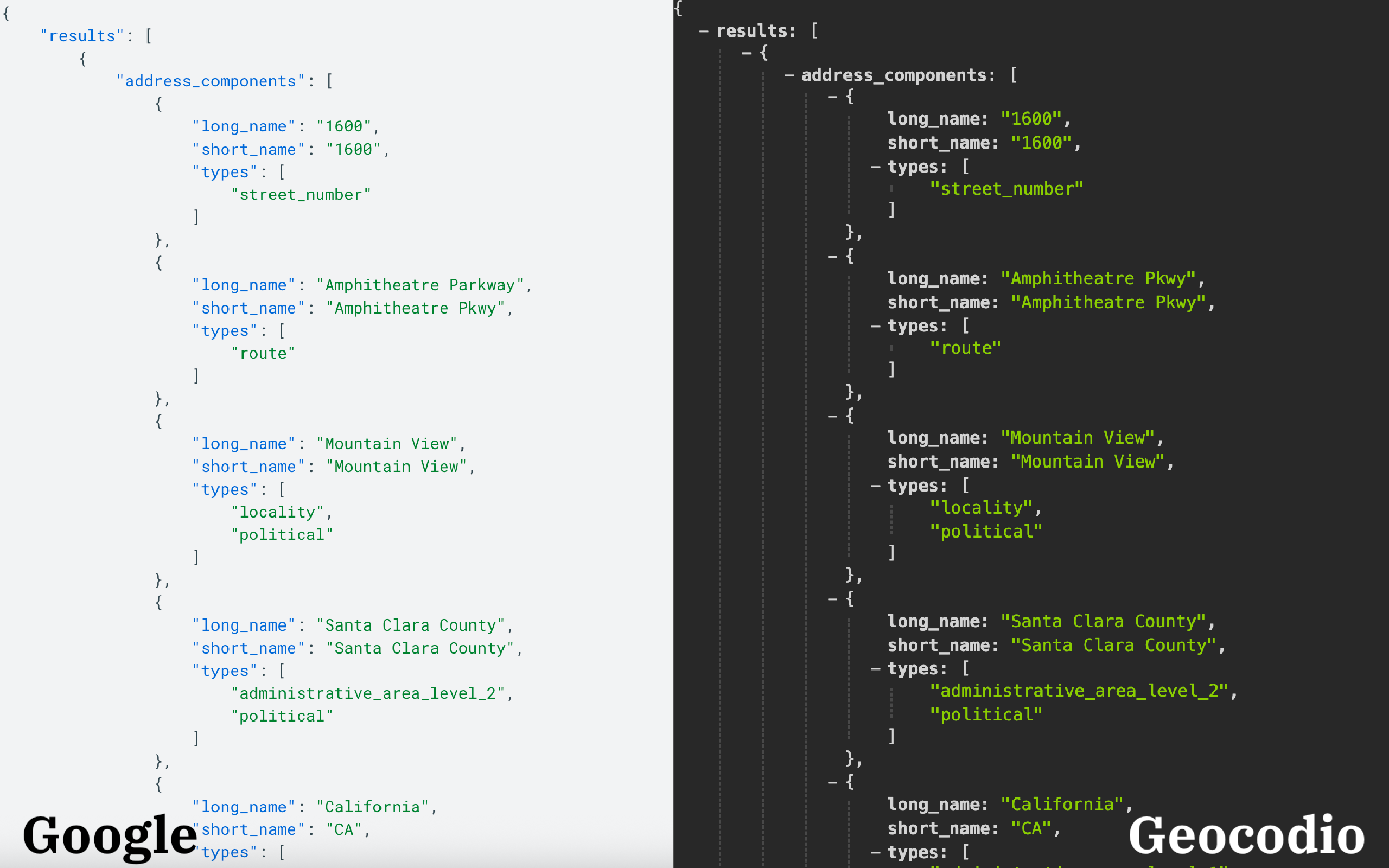
How the Geocodio Google Maps Geocoding API Compatibility Endpoint Works
Geocodio’s Google Maps geocoding API compatibility endpoint is available at https://api.geocod.io/maps/api/geocode/json and serves as a direct drop-in replacement for Google Maps' geocoding endpoint. All you need to do is change the host from maps.googleapis.com to api.geocod.io.
Both forward and reverse geocoding are fully supported.
Using Google Maps SDKs with Geocodio
You can continue using official Google Maps SDKs with minimal modifications. Here's an example using the Python SDK:
# Install: pip install googlemaps
import googlemaps

# Create client with Geocodio endpoint
gmaps = googlemaps.Client(
    key='YOUR_GEOCODIO_API_KEY',
    base_url='https://api.geocod.io'
)

# Forward geocoding
geocode_result = gmaps.geocode('1109 N Highland St, Arlington VA')
location = geocode_result[0]['geometry']['location']
print(f"Lat: {location['lat']}, Lng: {location['lng']}")

# Reverse geocoding
reverse_result = gmaps.reverse_geocode((38.886665, -77.094733))
print(reverse_result[0]['formatted_address'])
The same approach works with Node.js.
Supported Google Maps Features and Response Fields
Geocodio’s compatibility endpoint includes all essential Google Maps geocoding response fields:
| Feature | Status | Notes |
|---|---|---|
| ✅ Supported | Typed address component arrays (see details below) | |
| ✅ Supported | Full formatted address string | |
| ✅ Supported | Latitude and longitude coordinates | |
| ✅ Supported | Accuracy indicators (ROOFTOP, RANGE_INTERPOLATED, GEOMETRIC_CENTER, APPROXIMATE) | |
| ✅ Supported | Bounding box for the result | |
| ✅ Supported | Result type indicators | |
| ✅ Supported | Added when accuracy < 1.0 | |
| ✅ Supported | Response status codes (OK, ZERO_RESULTS, etc.) |
Address components and component filtering are also supported, allowing you to transform Geocodio’s address data into Google Maps format and filter results by country, postal code, locality (city), state/province, or street name.
Coverage and Limitations
Currently, Geocodio supports addresses in the United States, Canada, and Mexico. Requests for addresses in other countries will return a ZERO_RESULTS status.
A few Google Maps Geocoding API fields are not included in responses:
place_id is returned but always empty
plus_code is not included
The bounds and region parameters are not supported
The geometry.viewport field is approximated rather than based on actual address boundaries.
When to Use the Compatibility Endpoint vs. Native Geocodio API
Geocodio’s Google Maps API compatibility endpoint is ideal for migrating existing applications with minimal code changes.
For new integrations, we recommend using Geocodio's native API to access our full feature set, including:
Data appends: Enrich results with census data, timezones, congressional districts, and more
Batch geocoding: Process thousands of addresses in a single request
Detailed parsing: More granular address component breakdown
Higher accuracy: Rooftop-level geocoding for most US addresses
You can use both APIs with the same Geocodio account and API key, making it easy to migrate gradually while accessing Geocodio's extended features.
Ready to migrate from Google Maps?
With Geocodio’s new compatibility endpoint, switching your geocoding from Google Maps is no longer a major migration project, but a simple endpoint update that can unlock meaningful savings on your geocoding bill.
Start Here
To start using the new Google Maps API compatibility endpoint, all you'll need is a Geocodio API key. If you don't have one yet, sign up for free.
Have questions? Contact Geocodio support (real humans) at [email protected].
Related
Google Maps API Compatibility
Geocodio provides a compatibility endpoint that accepts Google Maps Geocoding API-style requests.
Geocodio vs Google Maps Geocoding
Geocodio is a Google Maps Platform geocoding alternative without all the hassle.
What happens when you exceed the Google Geocoding API Rate Limit?
Google has complicated rate limits in place for their geocoding.
Don't miss what's new
Geocodio ships new features and data updates regularly. We'll only email you with the good stuff, nothing else.
Thanks for subscribing! Check your inbox to confirm.